
Imagine asking a browser agent to mark “Write release notes” as done. On the DevDesk board, there are two cards with that title. One belongs to DevDesk and the other to Design System. If you mean the Design System task and the agent picks the first match, congratulations to the DevDesk release notes on their early retirement. 😅
A person can read the project on each card and choose the right one. An agent can also inspect the page, match the project and title, then operate that card’s dropdown. But the application already knows each task’s identity. The Design System card is DD-104, and moving it to Done is an operation we can give a name and a clear set of inputs.
That’s the idea behind WebMCP in Practice, a six-part series that starts with an HTML form and ends with an agent workflow we can test. We’ll use the same little task board throughout.
What WebMCP gives the agent
WebMCP is a browser API proposal for exposing page actions as structured tools. A tool can describe what it does, declare its inputs, and run application code when an agent invokes it. For DevDesk, a future list_tasks tool could give the agent task IDs and projects. The agent could then ask set_task_status to move DD-104 to done.
When an agent works from the DOM or screenshots, it has to find the right card and infer which control performs the action. With a tool, the agent still has to resolve what the user meant, but the app can provide the task data and an explicit way to update the chosen task. If the user gives only the shared title, the agent has a reason to ask which project they mean.
The WebMCP Community Group draft puts the imperative JavaScript API on document.modelContext. Chrome also documents an experimental declarative API for turning HTML forms into tools through annotations. That form API is being explored separately from the imperative draft. WebMCP Community Group draft · Chrome’s declarative API guide
The “MCP” in the name points to a familiar idea. A client discovers tools and calls them with structured arguments. With the Model Context Protocol, an MCP client connects to a server that provides capabilities. With WebMCP, a web page offers actions that run in the context of that page, where the app can use its current state. Chrome’s comparison of WebMCP and MCP
Run DevDesk
Part 01 is the browser app we’ll extend. It uses HTML, TypeScript, Vite, and localStorage. You can run this chapter in a modern browser with the default settings. The first tool arrives in Part 02.
With Node.js 26 or later installed, run these commands. The checkout selects the demo branch for this chapter. DevDesk Part 01 source
git clone https://github.com/Puppo/webmcp-in-practice.git
cd webmcp-in-practice
git checkout part-01-devdesk
npm ci
npm run dev
Open the URL Vite prints and try the board.
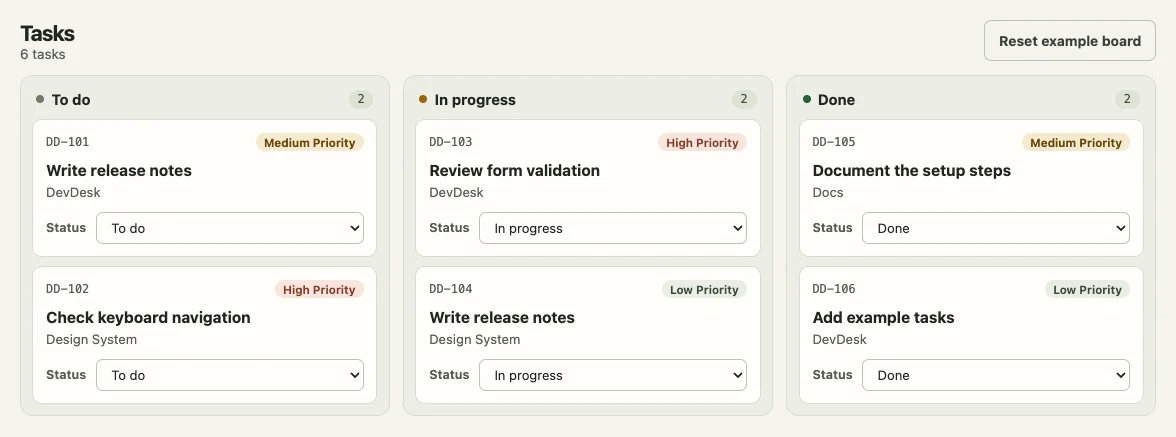
The example board has two cards titled “Write release notes,” one for DevDesk and one for Design System.
- Enter a title and a project, choose a priority, then select Add task. Your task appears in To do.
- Find
DD-104, the Write release notes card in Design System, and change its status to Done. The DevDesk card with the same title stays in To do. - Reload the page to check that your new task and the status change survived.
- Select Reset example board and confirm to replace your local changes with the original six tasks.
DevDesk saves the board for the current browser origin. There’s no backend or cross-tab sync, so the last tab to save wins. If the browser blocks storage, you can keep using the board and a warning tells you that your edits may be lost on reload.
Give each action one place to live
The status dropdown hands the selected card’s ID and new status to a TypeScript function. That function receives the current tasks and returns the result. The page code then saves the returned tasks and redraws the board. Source for the task operations
export function setTaskStatus(
  tasks: readonly Task[],
  id: string,
  status: unknown,
): TaskResult {
  if (!isStatus(status)) {
    return { ok: false, message: 'Choose a valid status.' }
  }

  const current = tasks.find(task => task.id === id)
  if (!current) {
    return { ok: false, message: 'Task not found.' }
  }

  if (current.status === status) {
    return { ok: true, tasks, task: current }
  }

  const task = { ...current, status }
  return {
    ok: true,
    tasks: tasks.map(item => (item.id === id ? task : item)),
    task,
  }
}
isStatus checks the incoming value at runtime. The function looks up the task by ID, so duplicate titles are fine. An invalid status or an unknown ID returns an error without changing the board. If the task is already in the requested status, repeating the operation succeeds and returns the original tasks.
The task rules sit in this function, away from the dropdown and storage. When we add the agent tool, it can call the same operation as the dropdown. The board will have one definition of what it means to move a task and what happens when the request can’t be applied.
Where we’re going
- The baseline. Run DevDesk and make sure the board works by hand.
- The declarative form. Annotate the create-task form so an agent can use it.
- Imperative tools. Add
list_tasksandset_task_status. - State and errors. Give the agent clear outcomes when a request succeeds or fails.
- Evals. Check whether an agent’s workflow produces the expected board state.
- Chrome agent skills. Use Chrome’s guidance to build and verify a workflow for archiving completed tasks.
Next, we’ll start with the form you used to add a task and give the browser enough information to offer it as a tool.