
Imagine an agent calls list_tasks, then set_task_status, and tells you the Design System release notes are done. Open DevDesk and there it is, the wrong card in Done. Both tool names look right in the trace. The arguments and the board tell a different story.
In Part 04, we made the tools report what happened when a task moved, an ID went stale, or a save failed. Now we can turn those outcomes into checks. We’ll start with the application behavior we can run locally, then use Chrome’s WebMCP Evals CLI to check the model’s calls and write a simulation that inspects the live board. Part 04 — Keep Tools Honest When State Changes
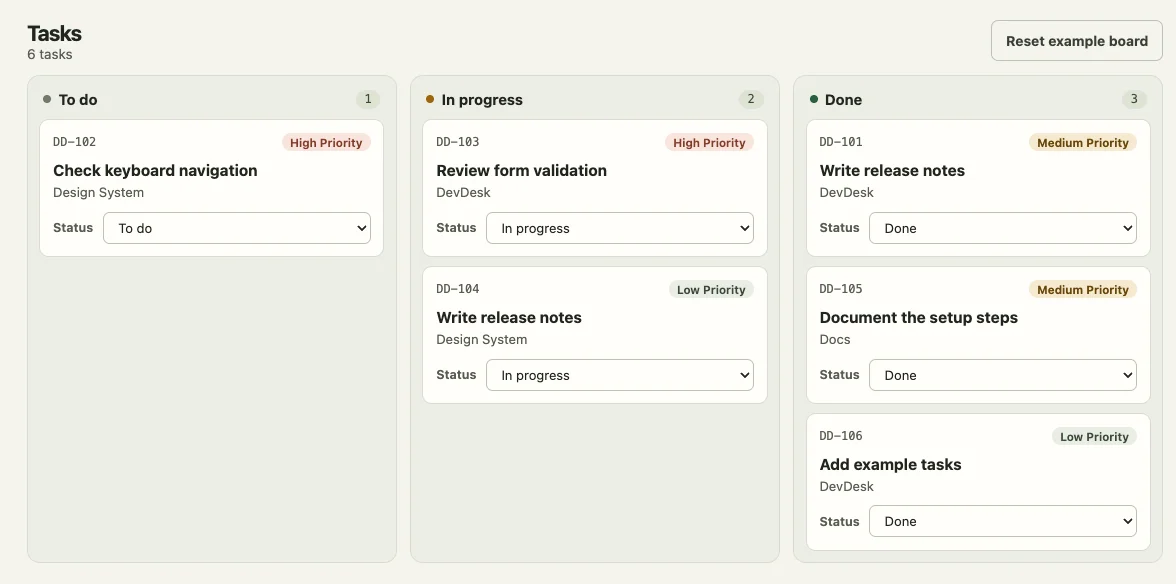
An intentionally reproduced failure state. The DevDesk card moved while the Design System card stayed put.
Run the application checks
With Node.js 26 or later, check out the branch for this chapter. The smoke test invokes the application’s imperative handlers in memory. You can run it without starting Vite, connecting a browser, or configuring a model. Part 05 demo
git clone https://github.com/Puppo/webmcp-in-practice.git
cd webmcp-in-practice
git checkout part-05-agent-evaluations
npm ci
npm run eval:smoke
npm test
Use npm run dev if you also want to open the board and try the examples by hand. The full suite runs the smoke cases alongside the task, storage, and registration tests. It also checks that evals/schema.json matches the imperative registrations and the schema we expect Chrome to generate from the declarative form. Schema drift test
Check what actually changed
The test starts from fresh fixtures and copies the board before invoking the tools. It captures each definition using a mock registerTool, then calls the real execute handlers with arguments supplied by the test. The storage outcome is supplied by the in-memory adapter. Here’s the case for the duplicate title. Smoke test source
const board = freshBoard()
const before = structuredClone(board.tasks)
const matches = await board.call('list_tasks', {
  project: 'Design System',
  query: 'release notes',
})
expect(matches.map((task: Task) => task.id)).toEqual(['DD-104'])
expect(
  await board.call('set_task_status', {
    taskId: matches[0].id,
    status: 'done',
  }),
).toMatchObject({
  changed: true,
  persisted: true,
})
expect(
  board.tasks
    .filter(
      (task, index) => JSON.stringify(task) !== JSON.stringify(before[index]),
    )
    .map(task => task.id),
).toEqual(['DD-104'])
expect(
  await board.call('set_task_status', {
    taskId: 'DD-104',
    status: 'done',
  }),
).toMatchObject({
  changed: false,
})
The board comparison catches an update to DD-101 even if the tool response looks successful. This test compares fixture rows by position, which works for an operation that preserves order. For a wider workflow that can insert, remove, or reorder tasks, compare snapshots by ID and check the expected fields.
Five smoke tests check board outcomes. They cover the qualified update and its repeat, the two results from an ambiguous lookup, the missing ID, instruction-like text returned as task data, and an update when persistence reports failure. The ambiguous lookup test proves that listing leaves the board alone. Whether an agent asks which project the user meant is a separate behavior to evaluate.
Run the local model evaluation
The demo pins webmcp-evals 0.1.0. From the same checkout, copy the example environment file and set GOOGLE_AI in .env to your Gemini API key. Then run the evaluation. This uses the default vercel backend and gemini-3.5-flash model. It makes model requests that can incur charges. Demo evaluation setup
cp .env.example .env
# Set GOOGLE_AI in .env before running the command.
npm run eval:local
The script runs webmcp-evals local -t evals/schema.json -e evals/evals.json. The 13 cases send user messages and static tool definitions to the model. The CLI compares the calls it gets back with expectedCall. Reports go into .evals/. To repeat each case three times, pass -r 3 after --. Chrome’s WebMCP evaluation guide · WebMCP Evals CLI
npm run eval:local -- -r 3Follow the calls from lookup to update
Take “I just finished writing the Design System release notes.” The ordered group expects a call to list_tasks with a release-notes query, followed by set_task_status with taskId: "DD-104" and status: "done". The lookup mock returns both release-notes tasks, so the model can use the project in each result to pick the right ID. An extra project argument is allowed because the CLI matches arguments as a subset. Model cases
Local mode returns each mockOutput by tool name. With that setup, the model can get a useful result even when it sends the wrong arguments. The CLI checks those arguments separately. DevDesk’s smoke suite replays the imperative mocks against the real handlers with sample arguments to catch drift. The model run uses fixtures throughout, so it leaves the board untouched.
Check the values the browser expects
The static catalog includes create_task alongside the imperative tools. A local run exposed a mismatch: the model sent High, the label it saw, but the form expected the value high. The form now uses Low, Medium and High as both labels and values. Chrome can represent them as a simple enum, and the submit handler lowercases the selected value before saving. You can compare the catalog with the browser’s generated schema in Application → WebMCP in Chrome DevTools. Form source · Static tool catalog
The demo’s November 15 run records 51 of 51 passing steps with gemini-3.5-flash and three runs per case. Earlier attempts helped refine the expectations. For instance, keyboard is a valid substring search for “Check keyboard navigation,” and an indirect release-notes request can resolve to DD-104 without a project filter. The passing steps describe the model’s calls in this run. Recorded local run
Simulate an outcome on the live board
What happens if you say “Complete the release notes task” and leave out the project? We want both cards to stay in their original lanes and the agent to ask which one you mean. The simulation can check both parts. Install Chrome Canary, the CLI’s default browser, and use the same Gemini key in .env. Start the app on port 5173, then run the simulation from another terminal. Simulation setup
npm run dev -- --port 5173 --strictPortnpm run eval:simulate -- --model google:gemini-3.5-flash --judge-model google:gemini-3.8-flashThe script runs webmcp-evals simulate -u http://localhost:5173 -s evals/simulations.json. Each trial starts with fresh browser storage and the example board. Here’s one assertion from the ambiguous-title case. It checks that the Design System card is still in In progress.
{
  "type": "dom",
  "selector": "[data-status='in-progress'] [data-task-id='DD-104']",
  "expect": { "exists": true }
}
The other assertions check the DevDesk card and the number of cards in Done. The case’s successCriteria asks the model judge to check that the agent names both projects and asks which task the user meant. Another case uses a simulated user who supplies the project only after the agent asks. Both agent and judge can make billable model requests. Live simulation cases
The branch contains seven simulations. A live run is still pending, including the creation case where the browser waits for a person to submit the form. That case expects the board to keep its original six cards. If the runner times out while the form is waiting, inspect the pending review and record the timeout.
Try a paraphrase
Change the ordered case prompt to “The release notes for the design system are ready. Can you close that task?” Run the local evaluation again and check which ID the model chooses. Then try the same wording in the qualified-title simulation and check where DD-104 and DD-101 end up. The call trace shows what the model tried. The DOM assertions show where the cards landed.
In the final chapter, we’ll use a coding-agent skill to build a task archive with human review.