1 min readIt's Prisma Time · Part 4 of 16

It's Prisma Time - Create Db

Hi Guys 👋 welcome back. Finally, today it's time to create our database, so don't waste time, and get...

#javascript#typescript#database#orm
Luca Del PuppoLuca Del Puppo
Article Series · Part 4 of 16It's Prisma Time
View full series (16)
  1. #3Previous
    Create Table
  2. #4Reading now
    Create Db
  3. #5Up next
    Create Relations
Browse all 16 parts in this series
  1. #1Introduction
  2. #2Setup
  3. #3Create Table
  4. #4Create DbCurrent
  5. #5Create Relations
  6. #6Insert
  7. #7Delete
  8. #8Update
  9. #9Select
  10. #10Pagination
  11. #11Aggregate and GroupBy
  12. #12Transactions
  13. #13Logging
  14. #14Execute your own queries
  15. #15Migrations
  16. #16Seeding

Hi Guys 👋 welcome back. Finally, today it’s time to create our database, so don’t waste time, and get started. How can you create your database? It’s simple! You have to run the following script:

npx prisma db push

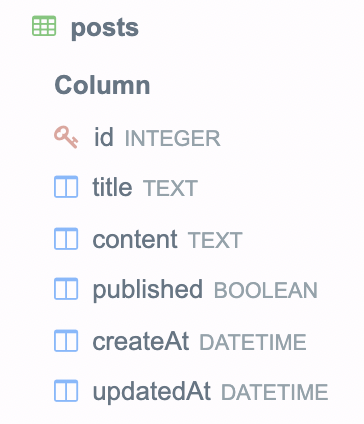
This script creates in your prisma folder a SQLite database called dev.db. The database’s name is taken from the variable DATABASE_URL in the .env file and inside of the file you can find the next table. Post Table Ok, now you have your database so it’s time to get back at the challenge left open last article. Run the script
yarn dev
{ posts: [] }

it's work Ok, there aren’t data but it works 🥳 So now you have a database and you can search data inside it, at this point, it’s time to create relations between our entities, but it’s the goal of the next article 🤪

That’s all for today guys! See you soon Bye Bye 👋

You can find the code relative to this post in the GitHub repository

Luca Del Puppo

Written by Luca Del Puppo

Run, Code & Learn

AI Native Engineer at Nearform based in Povegliano (TV), Italy. Google Developer Expert in Web Technologies, GitKraken Ambassador, and Codemotion Ambassador.