# WebMCP in Practice — Turn an HTML Form into an Agent Tool
> Expose DevDesk's create-task form as a declarative WebMCP tool, with a person reviewing the details before submission.
- **Author**: Luca Del Puppo (@puppo92) — AI Native Engineer at Nearform
- **Published**: Nov 16, 2026
- **Canonical URL**: https://blog.delpuppo.net/webmcp-in-practice/webmcp-declarative-forms/
- **Series**: WebMCP in Practice (Part 2 of 2) — https://delpuppo.net/blog/series/webmcp-in-practice/
- **Series LLMs.txt**: https://delpuppo.net/blog/series/webmcp-in-practice/llms.txt
- **Category**: Web Development
- **Tags**: webmcp, ai, typescript
- **Blog Index LLMs.txt**: https://delpuppo.net/blog/llms.txt
## Series Context: WebMCP in Practice
- Part 1: [WebMCP in Practice — Give AI Agents a Clear Way into Your App](https://delpuppo.net/blog/webmcp-in-practice/webmcp-in-practice-introduction/)
- Part 2: [WebMCP in Practice — Turn an HTML Form into an Agent Tool](https://delpuppo.net/blog/webmcp-in-practice/webmcp-declarative-forms/) **(Current Article)**
---
In [Part 01](https://blog.delpuppo.net/webmcp-in-practice/webmcp-in-practice-introduction/), we built DevDesk, a small task board. Today, let's give an agent a way to prepare a task using the form already on the page.
In the demo, I tell the agent I need to review the DevDesk changelog ASAP. The agent can turn that request into a task title, a project, and a priority. You get to check those fields, edit anything that looks wrong, and decide whether to submit.
We'll use Chrome's **experimental declarative WebMCP API**. It adds annotations to HTML forms so a supporting browser can expose them as tools. This form API is being explored separately from the [WebMCP Community Group's imperative API draft](https://webmachinelearning.github.io/webmcp/); details and browser support can change. See [Chrome's declarative API guide](https://developer.chrome.com/docs/ai/webmcp/declarative-api) for the current behavior.
## Run this chapter
The [Part 02 demo branch](https://github.com/Puppo/webmcp-in-practice/tree/part-02-declarative-form) contains the complete example. With Node.js 26 or later installed, check out that branch and start DevDesk.
```sh
git clone https://github.com/Puppo/webmcp-in-practice.git
cd webmcp-in-practice
git checkout part-02-declarative-form
npm ci
npm run dev
```
Open the URL printed by Vite. The form works by hand in an ordinary browser: enter a title and project, select a priority, and click **Add task**. To try the agent flow, use a browser and agent setup that supports the experimental declarative API; check Chrome's current documentation for its availability and setup. Inspect the tools actually available to the agent and look for `create_task`. The presence of a model context API alone doesn't prove this form was registered or that declarative forms are supported.
## Describe the form as a tool
Here's the [form from the demo](https://github.com/Puppo/webmcp-in-practice/blob/part-02-declarative-form/index.html):
```html
```
`toolname` gives the action a stable name, and `tooldescription` explains when to use it. The controls' `name` attributes identify the inputs: `title`, `project`, and `priority`. Their labels describe the fields, `required` marks title and project as required, and the select provides the allowed priority choices, with medium selected initially. Chrome also supports `toolparamdescription` when a field needs a more explicit description; this demo uses its labels.
Notice what's missing: `toolautosubmit`. In the documented flow, the browser can fill and focus the form, but the person must submit it. Review the values, change them if needed, and choose **Add task** when ready. You can also cancel the agent operation instead of submitting. Until submission, the form is a proposal, not a new task.
The form itself declares `create_task`. We don't also register an imperative tool with the same name: one action has one entry point here. The existing submit handler still owns the application behavior.
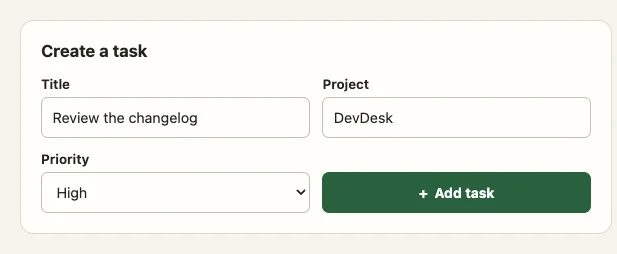
*The form with example values before submission. These values were entered manually to illustrate what you would review.*
## Keep the existing submit path
The handler reads the form and passes its values to the same `createTask` operation used by the app. This is the actual [submit handler](https://github.com/Puppo/webmcp-in-practice/blob/part-02-declarative-form/src/main.ts):
```typescript
form.addEventListener('submit', event => {
event.preventDefault()
const fields = new FormData(form)
const result = createTask(
tasks,
{
title: fields.get('title'),
project: fields.get('project'),
priority: fields.get('priority'),
},
`DD-${crypto.randomUUID()}`,
)
if (!result.ok) {
if (event.agentInvoked) event.respondWith(Promise.resolve(result.message))
formError.textContent = result.message
formError.hidden = false
return
}
clearFormError()
form.reset()
updateBoard(result.tasks, `Added ${result.task.title} to To do.`)
titleInput.focus()
if (event.agentInvoked) {
event.respondWith(
Promise.resolve(`Created ${result.task.id}: ${result.task.title}.`),
)
}
})
```
`preventDefault()` stops the normal navigation. The task operation validates the values and returns either an error or the updated task list. On success, the page resets the form and updates the board. On failure, it displays the validation message.
For a submission reported as agent-invoked, the handler also calls `respondWith()` with a promise containing a message for the agent. Both success and validation failure are plain strings in this example; the error isn't a structured error response. Also, the success message says the task was created, not that it was durably saved. If browser storage fails, DevDesk keeps the change in memory and shows a warning, but the task may disappear on reload. We'll give agent outcomes more structure in a later chapter.
## Try the review step
> 🎬 **Watch on YouTube:** [Declarative WebMCP demo](https://www.youtube.com/watch?v=zbHQTLmDbr0)
### Try it with Chrome’s WebMCP extension
You can use the example WebMCP extension from GoogleChromeLabs as your agent. The extension requires Node.js 22.18 or later and Chrome 155 or later with `chrome://flags/#enable-webmcp-testing` enabled. In the extension checkout, copy `.env.example` to `.env`, choose a `MODEL` and set its provider key. Run `npm install` and `npm run server`, then run `npm run build` in another terminal. Open `chrome://extensions`, enable **Developer mode**, and use **Load unpacked** to select the extension’s `dist/` directory. [Extension setup](https://github.com/GoogleChromeLabs/webmcp-extension#get-started)
Open the extension’s side panel on the running DevDesk tab and look for `create_task` in the tools list. Then try the prompt from the video:
> I have to review the changelog of the DevDesk project ASAP.
If the extension asks for permission, allow the tool call. That lets the agent fill the form. You still decide whether to submit it on the page. Check the proposed title and confirm that the project is `DevDesk` and the priority is `high`. Edit a value before submitting, then confirm the task that appears on the board reflects your final choice. Try another request and cancel it: no new task should be created from that cancelled operation.
You can still test creation and validation manually when the experimental tool isn't available. The demo’s automated tests cover the application code. Use the side-panel exercise to check tool discovery and the review step in your browser.
Next, we'll use imperative tools to list tasks and change a task's status by ID. For now, one ordinary form gives us a useful boundary: the agent prepares the details, and you decide when to create the task.